Modules
The modules of the system are the ones that appear in the following diagram:
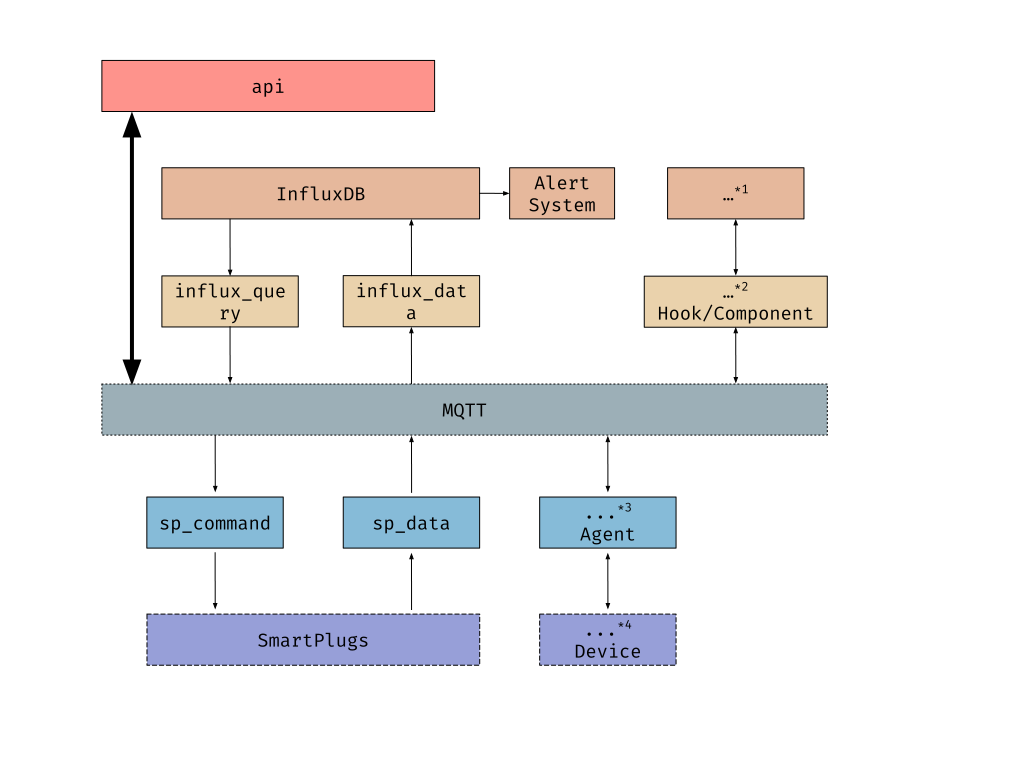
MQTT
This is not a module, but a publish/subscribe message broker technology. Nevertheless it is important to know what is the design behind all the communications through this technology; how the topics are organized and constructed, and how the messages are formatted.
api
This module is a REST HTTP gateway for communicating with the IoToad system.
Whenever you want to query data or send a command, you do it through this module.
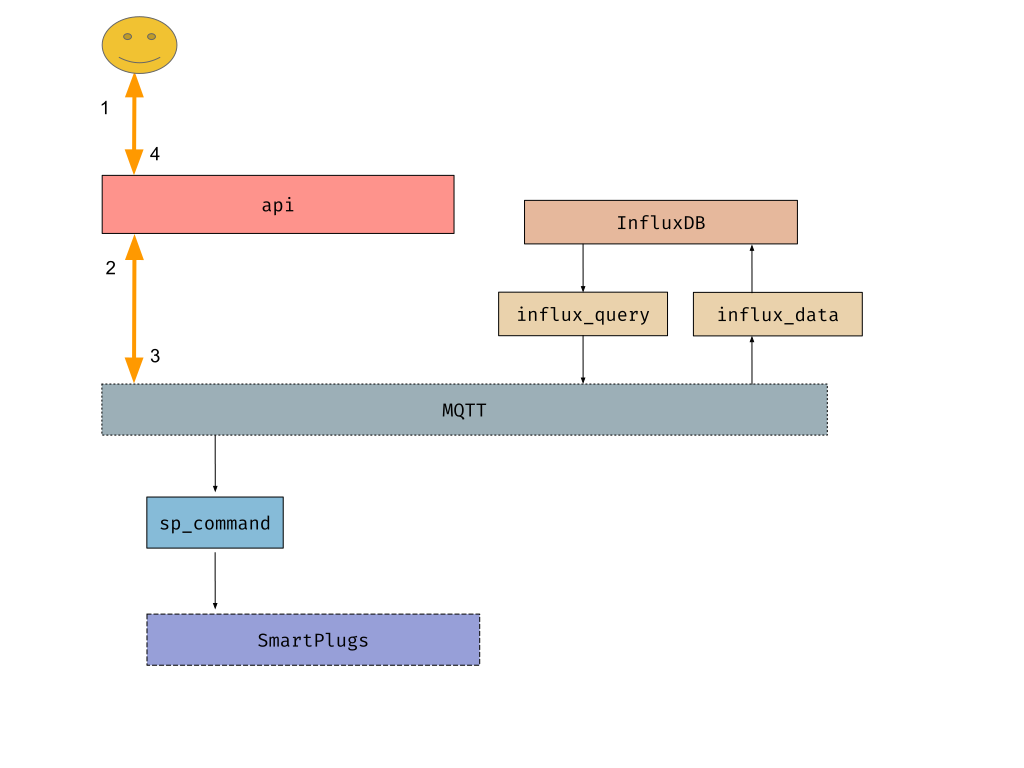
It is a dumb module that its only logic is:
Listen for HTTP REST requests
Parse the request, and send it to MQTT so that other module (such as
influx_queryorsp_command) handles the query/commandWait for the reply listening on a MQTT
Send back the reply to the HTTP request sender
influx_query
This module is responsible for querying InfluxDB and returning the response.
influx_query subscribes to query/influx_query/# MQTT topic,
so that the topics are query/influx_query/<database>/<measurement>.
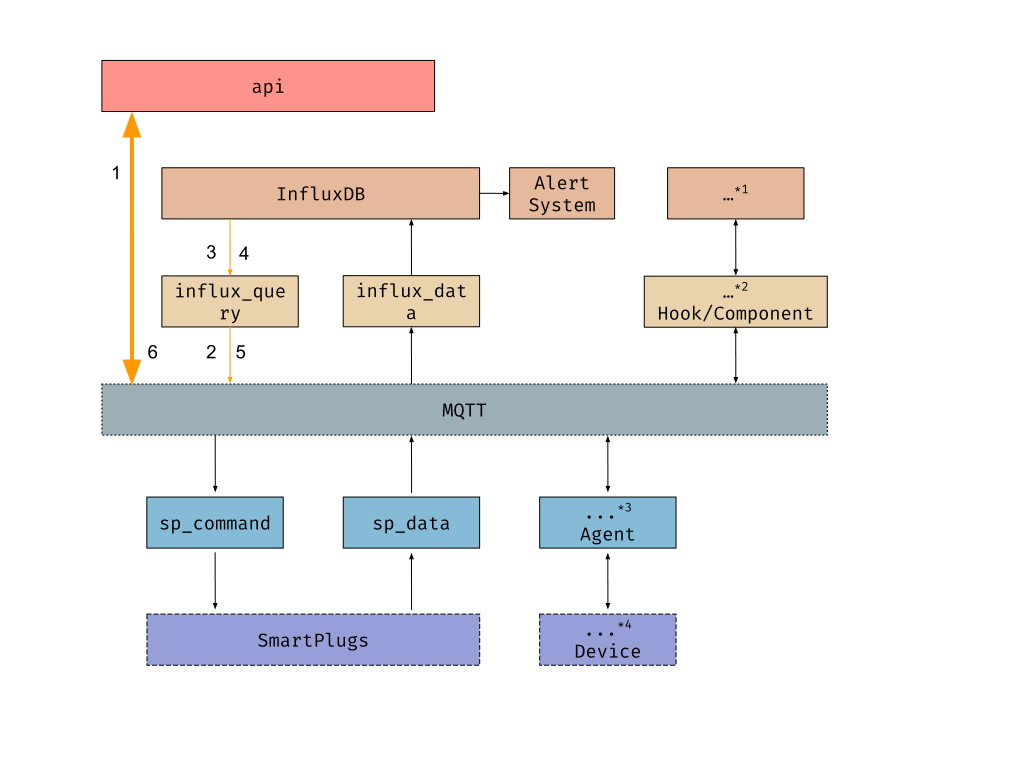
The message recieved follows the format specified in MQTT,
where the query arguments are inside the data field. The message also conatains
the response_topic field that is used for later publishing the response to.
For example:
query/influx_query/sp/power
{
     "response_topic": "responses/api/809bd939baa44f1f87fdd1099ea05a62",
     "data": {
         "operation": "sum",
         "type": "w",
         "from": 1585217932.2041745
     }
}
Then, influx_query performs InfluxDB query, formats the result following SenML specifications,
and it publishes the result back to the response_topic topic. The SenML response is
inside the data field, or if there has been any error, the error field will be filled.
Following the example above:
responses/api/809bd939baa44f1f87fdd1099ea05a62
{
     "data": [
       {"n":"sum","v":1.2},
     ]
}
sp_command
This module is responsible for switching smartplugs on and off. Smartplugs can be
identified by their IDs, rows or columns. The smartplugs are specified in the MQTT topic.
For example, sp_command/row/1 will affect all smartplugs in row 1,
sp_command/column/2 will affect smartplugs in column 2 and sp_command/sp_w.r1.c2
will affect the smartplug with ID sp_w.r1.c2. The content of the request should
have a payload field with a JSON with one field: data. It can have a value
of either 1 (switch on) or 0 (switch off). An example of a topic and data:
sp_command/row/1.
{
  "payload": {
    "status": 1
  }
}
If multiple smartplugs, rows or columns are to be switched on or off,
the subtopics data field should be used. Each of the elements of
subtopics will be appended separately to the topic, forming multiple
complete topics. For example, in the example above four topics would be specified.
The first one would be sp_command/row/1 and the last one
sp_command/sp_w.r4.c5.
A valid topic and data for multiple targets:
sp_command/.
{
  "subtopics": {
    "row/1",
    "row/2",
    "column/1",
    "sp_w.r4.c5"
  },
  "payload": {
    "status": 0
  }
}
If a response topic is specified, a list of sucessful and unsuccessful smartplugs and the reason they could not be switched on or off will be returned. For example:
{
  "sp_command/row/0": {
    "data": {
      "successful": [
        "192.168.1.51"
      ]
    },
    "error": {
      "192.168.1.51": "timeout"
    }
  }
}
sp_data
This module is responsible for collecting power measurements from smartplugs and
sending it to MQTT. Data will be published to the MQTT topic data/sp_data/<database>.
The value of database is specified in the configuration file. If multiple databases
are specified, data will be published to multiple topics: one for each database. An example
might be influx_data/sp: the sp database of the influx_data module.
Example of topic and data:
data/sp_data/influx_data/sp
{
  "data": [
    {
      "bn": "sp_w.r0.c0/power",
      "bu": "W",
      "t": 1593599018.0395682,
      "v": 0
    }
  ]
}
The IP addresses of each smartplug are unknown, thus the module sends request to a
known range of IP addresses and matches the MAC addresses of the responding devices
to the known MAC addresses of smartplugs to identify them. There is one routine for
each smartplug. The range of IP addresses is defined in the [WORKSPACE]
section of the configuration file. ETCD is used to store smartplug IDs, map addresses
and their last known IP address. There are three ETCD directories:
/smartplugs/mac_to_id to map MAC addresses to smartplug IDs,
/smartplugs/id_to_userid to map smartplig IDs to user IDs and
/smartplugs/ip_cache to store last known IP addresses.
influx_data
This module is responsible for storing data to InfluxDB. Other modules
publish the data into data/<source-id>/influx_data/<influx-database>.
And influx_data reads and stores it.
Listen for MQTT messages in topics that match:
data/+/influx_data/#Transform message into Influx data points
Store data points to InfluxDB
If a module wants to store data into InfluxDB, it should make use of influx_data.
For it, there are some conditions that must be fulfilled:
The data must be published through MQTT to topics that match:
data/+/influx_data/#The MQTT messages must be formatted as defined in MQTT
The data to be stored in InfluxDB must be within the
datafieldand comply with the SenML format where BaseName+Name must be
<id>/<measurement>, e.g.sp_w.r1.c1/power